The road
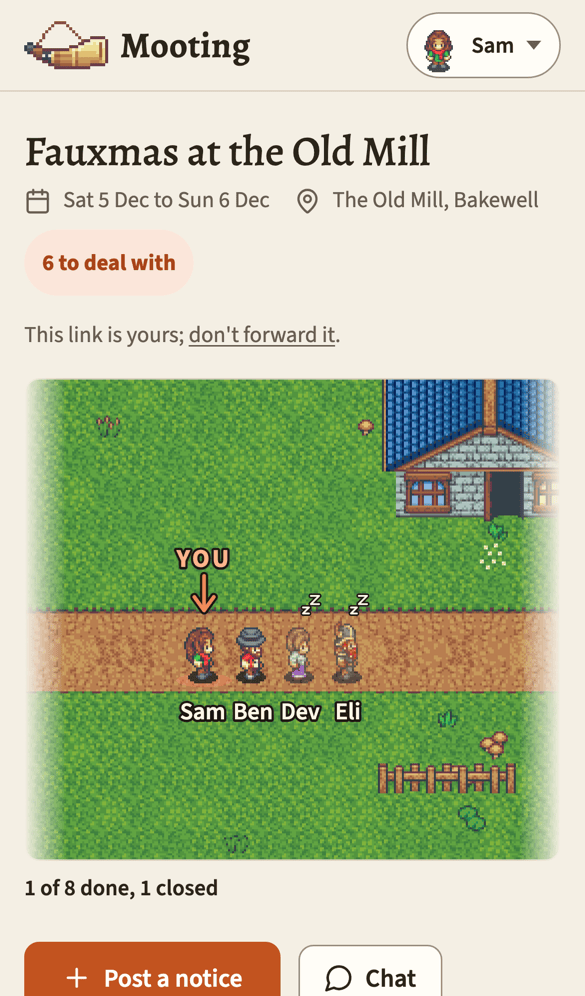
At the top of the board there's a drawing of a road. It's the notices underneath, as a picture: what everyone's been asked to do, and how far each person has got.
It scrolls sideways, and opens with you about a third of the way along. Before anything's been posted, it opens at the start.
What's on it
- A fingerpost at the start, with the venue on it (or the event's name, if there's no venue).
- A landmark for every announcement, question and action, in the order they went up: a forest with a great old oak, a river with a waterfall, a village with its inn, a campsite with a red pavilion. They're just scenery. They don't mean anything, and there's nothing to learn about them.
- The notice's title on a parchment plate under the road, below its landmark, with when it closes if it does ("closes Sun 18 Oct, 20:00"). An action with a date says "due Sun 18 Oct, 18:00", and "was due" once that's gone by. Long titles get shortened. A closed question gets a blue-grey plate that says closed.
- A little notice board on the verge for each pin, standing between the landmarks where it was pinned, with its title above it.
- A castle at the end, with a red banner under the gate showing the event's name.
Tap a plate or a notice board to jump to that notice.
Light and dark
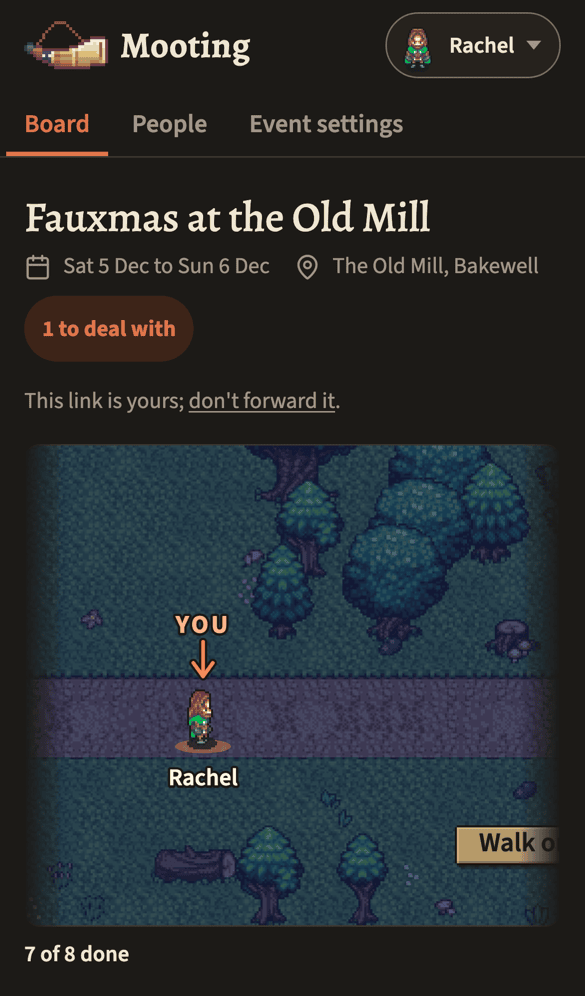
In the dark theme the road is drawn at night, and the figures get darker edges so they stand out.
Mooting is light unless you pick Dark or Device under Theme in your menu (tap your figure and name at the top of any of your pages). Device follows your phone or computer's own setting, and Light takes you back to the default.
Your choice goes with your link, so it sticks on every phone or computer you use. The help and front page follow it too, in any browser you've opened your link in.
Where you stand
Your figure stands at the first thing you still need to deal with. A small arrow and the word YOU mark which one's you.
If you've answered a later question but not an earlier one, you stand at the earlier one. That's really the point of the drawing.
An action holds you until you've ticked Done. Got it isn't enough: you've seen it, but you haven't done it yet.
A closed question lets everyone past, answered or not, so it never holds you back.
Once there's nothing left waiting on you, you stand at the castle, facing forward, with a tick after your name.
Before anything's been posted there's nowhere to stand, so everyone waits together just past the fingerpost, facing up the road, and your caption says "Nothing to do yet". The castle's still there at the end. Nobody's walked to it yet.
Walking on
When you open your board, anyone who's moved since you last looked walks from where you last saw them to where they are now. Then they stop. Nobody moves at any other time.
The first time you open the road on a phone or computer, everyone's just where they are. There's nowhere for them to walk from. And if your device is set to reduce motion, nobody walks at all.
The walk waits until the road's actually on screen. When you answer a question further down the board, the page comes back to that question, so the road's out of sight and nobody walks until you scroll back up.
If it was you who moved, a small pill pops up at the top left for a few seconds, with your figure walking in it. It says On to the next thing waiting on you, or All done if you've reached the castle.
- Tap On to… and it takes you straight to that next thing.
- Tap All done and it takes you up to the road, so you can watch yourself walk into the castle.
Either way, the walk plays whenever you next scroll up to the road. With reduced motion the pill still shows, but your figure in it stands still.
The caption under the road
Under the road there's a line like 2 of 5 done. The five is every announcement, question and action on the road. The two is how many of them you've dealt with.
A closed question you sat out counts in the five but not the two, so the caption can stop short and still be right.
At the castle it just says "All done".
Faint and asleep
A figure goes a little faint, with a small pair of z's over its head, when that person hasn't opened their board since something new went up a day or more ago. That's an announcement, a question or an action that went to them. Opening the board wakes them up again.
Pins never send anyone to sleep. Nor does a notice they posted themselves, one that's been taken down, one they've already answered, or an action they've tapped Got it on, done or not. Asleep is about seeing things. Someone with nothing new stays awake however long it's been, so a quiet week doesn't fade anyone.
It's not a telling-off. It just helps organisers spot who might have missed the last thing that went out.
Crowds and names
When several people stand in the same place, four stand side by side and four more stand behind. Anyone past eight becomes a small +N. (Nine overlapping figures would just be a smudge.) You're always at the front, and anyone asleep goes to the back.
Names go under the figures. A long one gets cut short with …. If a crowd's names won't fit on one line, every other name drops down to a second line. If they still don't fit, the longest ones get shortened a letter at a time, yours last of all.
What strangers see
The shared link page shows the same road, with the same figures and landmarks, but nothing that says who or what.
So there are no names, no YOU, no caption and no plates, and the roadside boards are blank. The fingerpost keeps the venue, because that tells a visitor where they've landed. The castle keeps its banner with the event's name, which the page tells them anyway.
Changing your figure
Tap your figure and name at the top right of any of your pages, then Your settings, then the Your figure tab.
The top shows your figure now. Below, all the figures are grouped up. Tap one and it's yours straight away, and the page says Saved.
Your figure follows you, so it's the same on every event you're on. You don't have to pick one: you're given one when you first arrive.
There are no points, no levels and no leaderboard. Your figure walks on, and that's it.