The People page
Being an organiser just means your link has the role. No accounts, no admin password. You can organise one event and be an ordinary member of another.
As an organiser you get People and Event settings in the bar at the top of the board, next to Board. Post a notice is a button on the board itself. Posting notices covers announcements, questions, costs and reminders, and Event settings covers starting an event and setting it up.
The first time you open People (or any organiser page) in a new browser, it asks you to check it's you with a 6-digit code. See Your link.
The People page is the whole event at a glance: who's been reached, who's dealt with what, and who hasn't. It's where you find out whether everyone's actually hearing what matters.
If anyone's waiting on you, the Asking to join card is at the top, under the counts. It lists everyone who's come in through the shared link, with Let in and Turn away, and anyone claiming a name (see below). It's at the top because it's the one thing on the page waiting on you, rather than on someone else.
On a bigger screen
On a tablet or computer, it's one table. People down the side, every announcement, question and action across the top in the order they went up, and a cell where each person meets each notice. Names and column headings stay put while you scroll.
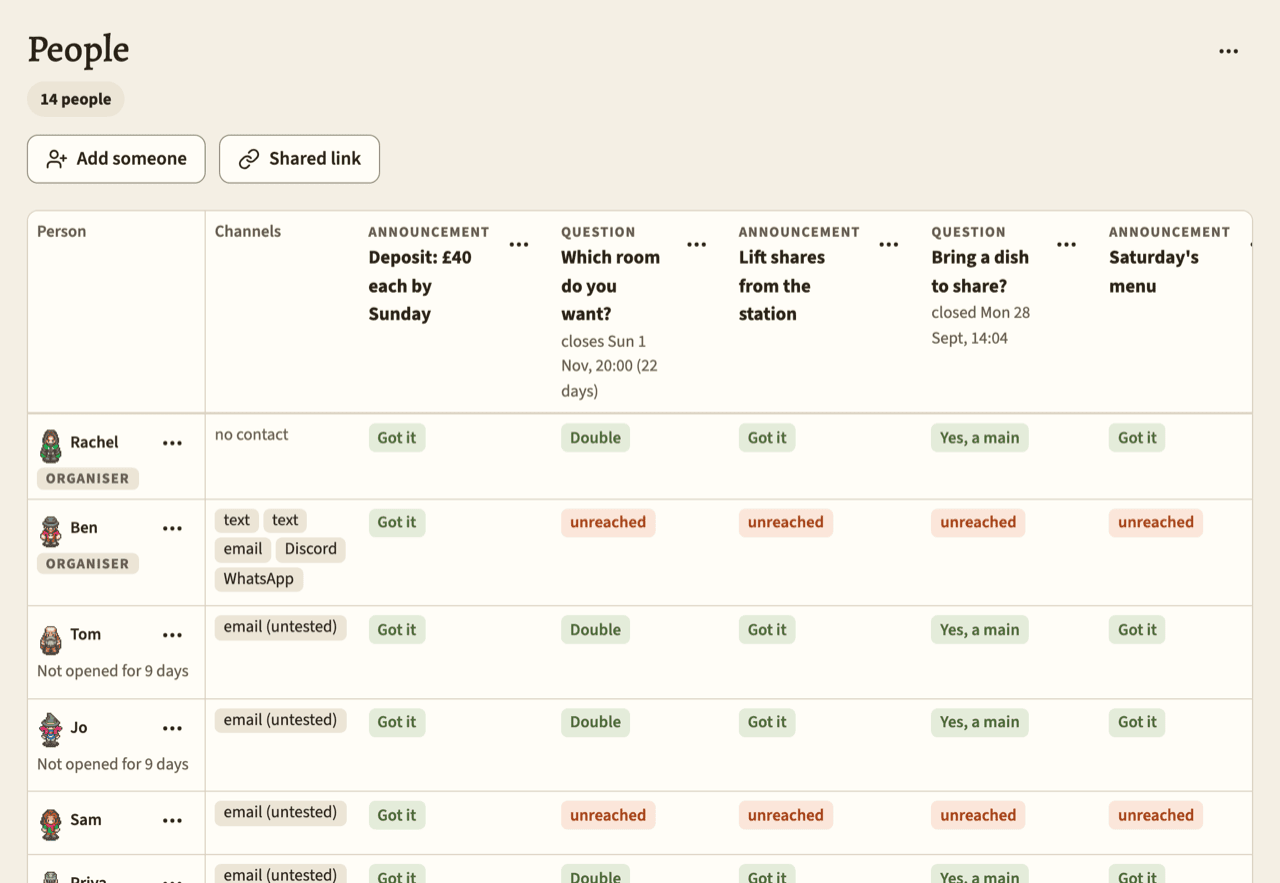
Under each name you might see organiser, asking to join, waiting for their answer, stopped everything, or no link yet (for someone you added by name only). A grey line under the name says Never opened, or Not opened for N days once it's been three days or more.
Everything you can do to a person is in the ⋯ menu next to their name: Edit, Preview as, Send link again…, Remind about what's waiting, Make organiser or Make a plain member, Remove from event, and Turn away for someone asking to join.
Everything you can do to a notice is in the ⋯ menu at the top of its column: Edit, Close now or Extend, and Take down.
Anything that tells people something, or can't be undone, checks with you first.
The bottom row adds up each column: 7 reached, and under it 5 of 9 done. "Reached" means something got through. "Done" means they tapped Got it, answered, or ticked an action Done. An action's column also says how many have seen it, done or not. Pins don't get a column, so they're listed underneath, each with its own Edit and Take down buttons.
On a phone
A phone shows the same page two ways, with a switch between them. Your choice is kept in the address, so reloading doesn't lose it.
By notice is the one it opens on. There's a card for each announcement, question and action, open ones first, newest at the top. Each card says when it closes, and has a bar: green for how many have dealt with it, grey for how many it's reached, with both numbers underneath.
Below that is everyone who hasn't dealt with it yet, grouped with the most urgent first: Seen, not done (for an action), Silent 3 days or more, Failed, Unreached, Sent and waiting, and Stopped (explained below). Tap someone who failed or was unreached to go to their Edit page.
Done, folded away underneath, shows who's dealt with it. For a question it's grouped by answer, with late answers marked, plus anyone who sat out. On a question where people can pick more than once, it's one list instead, each person with what they picked (Chicken ×2, Veggie). Each card has Edit, and a ⋯ menu with Close now or Extend, and Take down. Pins get a card of their own at the end.
By person has a row for each person, with whoever has most left to do at the top. Each row shows their figure, their name (with the same Never opened or Not opened for N days line), and a little dot for each notice in order. Green is done, orange is silent, an orange ring is failed or unreached, grey is sent and waiting, and dark is sat out or stopped. On the right it says one of:
- 2 to deal with, All done, or Unreached;
- Asking: someone from the shared link waiting for you to let them in;
- Invited: someone you invited, who's only waiting on themselves;
- Stopped: someone who's stopped everything from this event.
Tap a row to open it. You'll see their channels, every notice with its full state, the permission switches if a setting is on chosen people, and Edit, Preview as and Send link again…. Make organiser, Make a plain member and Remove from event are in its ⋯ menu.
What the states mean
The table's cells and the phone's groups use the same words:
- Silent 3 days or more. The cell says 3 days silent. It reached them that long ago, and they haven't done anything. It's red, because this is the one the page is really for.
- Failed. The cell says text failed (or whichever way it was). Every attempt gave up. Usually a bad number or a problem with the provider. Check the number.
- Unreached. Nothing went to them for this notice, usually because there was no way to reach them. Add one.
- Sent and waiting. It went recently, and they haven't dealt with it yet. The cell says sent (text), naming how it went; sending… while it's still queued (it'll go, and keeps trying); or text on hold while Mooting can't send that way (see When sending is on hold).
- Stopped. They've stopped everything from this event. They still count, and it's not the same as unreached.
- Got it, or their answer. They've dealt with it. A late answer shows the answer with late under it.
- sat out. The question closed without an answer from them.
- seen, not done. An action they've tapped Got it on but not Done. It still counts as waiting on them.
- Done. An action they've done. If an organiser ticked it for them, it says so underneath: ticked by Rachel.
Ticking people off
An action has a Mark done button for each person: next to their name on the action's card (in By notice), next to the action in their opened row (in By person), and under their cell in the table. Use it when you know they've done it, like when their deposit's arrived. Once they're done it says Mark not done, to take it back.
It doesn't ask first, because it undoes just as easily, and nothing's sent to them. The page says Ticked Tom done for "Pay the deposit". They haven't been sent anything. Their board says Done. Rachel ticked it for you.
An action's card also says when it's due, or Past due once the date's gone by. Anyone still not done after that is late. The action doesn't close, though, so they can still tick it themselves.
A cell, or a name under Sent and waiting, can have a second line showing reminders that went to them: last call, final call, reopened. That's just a note. The state still comes from the notice.
Channels
The Channels column (or the first line of an opened row, on a phone) says what Mooting has for each person. Hover over one for the number or address, partly hidden: +44 7700 •••• 89, t•••@example.com. You never see anyone else's in full.
- text, email, or no contact;
- text (untested), for a number nothing's got through to yet;
- push, push (unconfirmed), push (needs re-confirming);
- Discord, Discord (unconfirmed), Discord (needs reconnecting);
- WhatsApp, WhatsApp (unconfirmed), WhatsApp (not getting through), WhatsApp (stopped).
A device, Discord account or WhatsApp number that's unconfirmed or not working isn't a way through, which is why it says so. A WhatsApp number its owner switched off (by removing it or replying STOP) stays listed as stopped, so you can see why nothing goes there.
A wrong number still gets fixed the usual way: on their Edit page, add the right one, then remove the old one by its hidden label.
Devices, Discord and WhatsApp belong to the person. They aren't on the Edit page, and only the person themselves can add or remove them.
Who's asking, and who's invited
Someone asking to join came to the shared link and typed that name themselves, so the page shows it. Otherwise you'd be deciding about Let in blind. It doesn't show their number or address, though. You can see which way they gave; the number itself is nobody's business until they're on the event.
Someone who picks a name you'd already added (Kate, say) is a claim. It shows as Someone says they're Kate, with the number or address they gave mostly hidden (+44 •••• •• 89), when they asked, and from the shared link, so you can tell whether it's the Kate you know. It's in the card at the top, and on Kate's row in By person. Kate's name comes off the shared link's list while it waits.
- Let in makes it real. That number becomes Kate's, her link goes to it, and everything already under Kate stays hers.
- Turn away sends nothing, and puts Kate's name back on the list.
If Kate's got a link of her own some other way in the meantime, the claim can only be turned away.
Let in sends them a short message saying they're in, with their link. Turn away never sends anything.
While anyone's waiting, the board shows a line under its heading, 1 asking to join, which brings you here. The daily digest says the same, if you get it.
Someone you invited by typing a contact Mooting already knew shows under the name you typed, with You invited them by text (or by email) under it. Not their own name, no figure, no number, and waiting for their answer next to it. They haven't agreed to anything yet, and showing their own name would tell you whose number you'd typed. The name you typed is just yours, so it's there to tell your invitations apart. If someone typed a number Mooting knew at the shared link, it's the name they typed there, with Added by text at the shared link. (Older invitations, from before names were kept, just say Someone you invited by text.) Once they say yes, it's their own name. There's no Let in, because it's their answer to give. There's only Turn away, which takes the invitation back.
Adding people
The Add someone card takes a name and, if you've got one, a number or email.
For a number, pick its country, then type it the way someone would dial it there (07400 123456 for a British phone, 070 123 45 67 for a Swedish one). Or write it in full with a + and the country code, and it's taken as it is. Get the country wrong and the page says so, and names it, rather than saving a number that goes nowhere.
For someone new, their link goes straight away. That's the first test of the number too, so you find out it's wrong while you're still on the page.
A name on its own is fine. Choose Nothing yet and they show as no link yet, until they find themselves on the shared link.
If Mooting already knows the number or address, it doesn't make a second copy of that person, and it doesn't put them on your event either. They're invited instead. They get a message on the contact they already had, saying you added them. Next time they open their link, the event asks Rachel added you to Fauxmas. Do you want to join?, and they answer Yes, I'm in or No thanks. You can't answer for them, and until they say yes the page doesn't name them or show their contacts.
If they say no, you'll see them go. Turn away takes the invitation back before they've answered.
Send link again…
Send link again…, in a person's ⋯ menu, re-sends their current link. It's the fix for "I've lost the text". It never makes a new link, so nothing stops working.
It opens a box, Send Tom's link again, listing every contact that can take a link. Each shows enough of the number or address to tell which is which, and what it costs: a text is about 5p (more if it takes two texts), WhatsApp is Meta charges a little, and email and Discord are free.
The ones Tom's switched on for Announcements and questions start off ticked. If there aren't any, the first free one's ticked; if they all cost money, the first one. Tick whatever you want and press the button, which shows how many you've ticked and the cost (Send to 2, about 5p). It won't send with nothing ticked. Afterwards the page tells you what went where: Sent Tom's link by email and Discord.
The box only lists contacts that can take a link:
- numbers and addresses (and numbers only in countries this Mooting texts);
- WhatsApp and Discord, once they're confirmed and still getting through.
Not a device, not a removed contact, and not one an organiser typed in that nobody's confirmed, once that person's link has got through somewhere. If there's nothing to send to, the box says so.
Remind about what's waiting
Remind about what's waiting, in the same menu, is for chasing one person. It sends a single message listing what's still waiting on them (up to three titles, then and 2 more), with their link, on the ways they've chosen for announcements and questions.
It checks with you first, with the cost if it'll text: Text Niamh about 2 things? about 5p. Afterwards the page shows you what it said (minus the link), and reminded against each notice it mentioned.
It's only in the menu when there's something waiting and it's allowed to go. Not for someone who's stopped everything from the event, and not within twelve hours of their last reminder (yours, or one of the automatic ones before a deadline).
It counts towards the month's texts like anything else, and once the cap's reached it goes by email instead. It only goes by WhatsApp when what's waiting is one question with a closing time, because that's the only reminder Meta has approved; otherwise it goes the other ways.
And it stands in for an automatic reminder. If one's due within twelve hours of yours, about the same question, it isn't sent.
Letting people in
The Shared link card has the event's shared link, with Copy link and, on a phone, Share, so you can drop it straight into the group chat you've already got. What people see when they open it is in Joining an event.
People asking to join through it, and anyone claiming a name, are in the card at the top of the page. Turn away takes someone asking off the event, or drops a claim, and doesn't send anything. People you invited aren't in that card. They came through you, not the link, and they're waiting on their own answer.
Whether newcomers wait or walk straight in is a setting in Event settings. The card tells you which.
Fixing a name or number
Edit is for people who are in on this event. You can change their name, remove a contact, or add one (a number with its country, same as everywhere else).
Removing stops a contact rather than deleting it, so a later typo can't hand the number to somebody else. Nothing goes to it again: no notices, no reminders, no links.
Adding a contact does one of two things:
- For someone whose link hasn't got through yet, it goes out straight away. That's how the contact gets tested. It's the same for someone you added who's never had a link and for someone whose only link went to a number that never took it: add their email and their link goes there.
- For someone whose link has got through, it's saved, untested, and nothing is sent to it. Got through means it arrived on a number or address that's now confirmed, or they've opened the board with it. A number you typed is one nobody's confirmed, and if it got their link, one form could hand their whole Mooting to whoever has that phone. Only they can confirm it, from How you're reached, so let them know it's there.
Renaming someone, or removing a contact, changes that person everywhere. There's no separate copy per event. So you can only do it while this event is all there is to that person's Mooting: someone you added who's never picked up a link, or someone who isn't on any other event. Otherwise the page says is on other events too, so only they can change their name and contacts, from How you're reached, and doesn't offer either.
Nothing you change here is announced to them. Devices aren't listed: a phone belongs to whoever's holding it, and only they can turn its notifications off.
You can't edit someone who's asked to be deleted. Someone is the name they asked for.
Preview as
Preview as shows their board as they see it: what's waiting on them, where their figure stands, what they answered. Think of it as a photograph. All the buttons are dead, because a working preview would let you answer as them. A bar across the top says whose board it is, with Back to go back to their row.
It deliberately leaves out their other events. Which other events someone's on is their business.
Removing someone
Remove from event, in an ordinary member's ⋯ menu, takes them off the event, once you've confirmed. Their answers and chat messages stay exactly as they were, so the tallies and the record don't shift under anyone's feet. What goes is their place on the event: the road, the counts of who's waiting, any notifications from now on, and this event's part of their daily digest.
People can also leave by themselves, from their own settings. That works just like Remove, and a quiet line under the counts says Tom left this event for a month afterwards. You aren't sent anything. They can ask to join again from their link, and then they're in Asking to join like anyone else.
You can't remove an organiser this way; make them an ordinary member first. And you can't remove yourself. Someone you've removed can still use their link for their other events. It just won't open this one any more: if they try, they land on their events page instead.